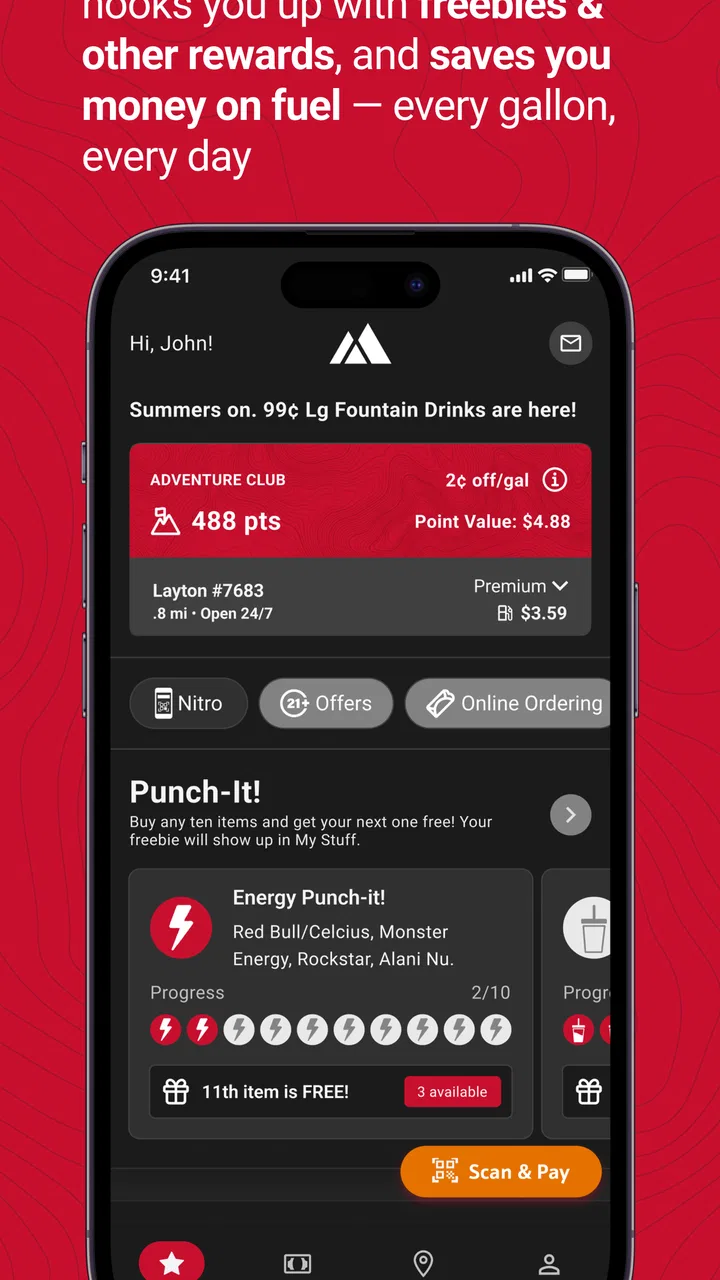
Maverik Rewards
- 4.6
- Rating
- 1.00M
- Installs
- Free
- Price

 Analysis by App-foxy
I tend to judge rewards apps by what happens during an ordinary stop, not by how impressive the download page sounds. Maverik Rewards is built for that exact moment: I am already visiting a Maverik store, I want the app to recognize that visit, and I hope the resulting benefits are worth the small amount of attention it asks from me. It is a free business app from Maverik, Inc, aimed at people who regularly buy fuel, drinks, snacks, or meals at Maverik locations.
The basic promise is straightforward: use the app to take part in the rewards program, look for available benefits, enter sweepstakes, find nearby stores, and collect digital rewards such as G-Cards or food-related offers. In my experience, its value depends less on exploring every screen and more on building a simple habit around visits you were already going to make. If Maverik is part of your routine, that distinction matters.
From planning a stop to using the reward
Before I leave, I like to think through what the stop is for: a quick meal, a fuel break, or both. That small decision helps me judge whether a listed reward fits the trip instead of letting a promotion steer the plan. It also makes the next step easier, because I can arrive knowing what I want to check rather than sorting through options at the counter.
You May Also Like

 Blood Strike: 2.5 Anniversary
Blood Strike’s Loadouts Turn Every Drop Into a Tactical Gamble
A close look at Blood Strike’s custom loadouts: how fast access to signature weapons reshapes its battle royale rhythm, rewards preparation, and narrows the gap between fights.

 Pandora - Music & Podcasts
Pandora’s Music Is Easy to Start, but Harder to Recover
Pandora’s strength is its low-effort path from a seed to a station. Its weak spot is how much confidence it asks you to place in connection, setup, and quiet recovery.

 8 Ball Pool
 Is Built on Rivalries, Rematches, and Routine
A close look at the rivalries, rematches, shared routines, and unanswered safety questions that turn a quick pool match into a persistent mobile community.

 Samsung Music
’s Quiet Strength Is Playing What You Already Own
Its reach comes less from spectacle than from dependable access to a personal library. That simplicity is both the app’s strongest retention engine and its ceiling.

 AccuWeather: Weather Radar
AccuWeather Review: A Quick, Clear Forecast for Everyday Decisions
For everyday plans, the best forecast is the one you can understand quickly. AccuWeather makes rain timing, radar, and local conditions easy to act on, with a few trade-offs.

 Hill Climb Racing
Why Hill Climb Racing Still Turns Crashes Into One More Run
A tiny car, a bumpy hill and one more upgrade: Hill Climb Racing keeps resurfacing because its simple chaos makes every near-miss feel personal.
More From Our News Desk



Starting with the right expectation
The first thing I would tell a new user is not to treat Maverik Rewards like a general coupon marketplace. It is tied to Maverik’s own business, so the app makes the most sense when your route, commute, or travel plans already include one of its stores. Someone who rarely visits Maverik will have fewer natural opportunities to benefit, even if the app itself is free.
The app is listed for Everyone, which fits its practical purpose. It is not a complicated finance tool or a specialist business system; it is a customer-facing rewards app. The current version is 7.3.2, and the minimum operating system is 9, so compatibility is worth checking before planning to use it on an older phone. On a reasonably current device, the important question is not whether it has a long feature list, but whether it helps you complete a store visit without slowing you down.
Maverik Rewards has been available since May 27, 2014, and its scale suggests that it is not a tiny experiment. It has passed over a million installs, with an average rating of 4.7 from around twenty thousand ratings. I see that as encouraging, but not as a reason to ignore the details of your own routine. A highly rated rewards app can still be a poor fit if the stores are inconvenient, if you dislike managing digital offers, or if you prefer to keep every purchase completely separate from an app.
Step one: finding a store before leaving
The store-finding function is more useful than it may first appear. I would use it before starting a trip rather than waiting until I am already driving around looking for a stop. That lets me decide whether a Maverik location fits the route and whether the planned visit is worth making part of my rewards routine. It is especially practical when traveling through an unfamiliar area and trying to combine a fuel stop with food or drinks.
This planning stage is also where the app can prevent an unproductive visit. If Maverik is not conveniently located, opening the app early makes that clear before you change your route. A rewards program should support a purchase you already need, not persuade you to make a longer detour for a small benefit. I consider that an important trade-off: the app can make a chosen stop more rewarding, but it does not automatically make an inconvenient stop economical.
Before heading out, I would also look through the available rewards and sweepstakes areas rather than assuming every benefit works the same way. The useful habit is to check what is relevant to the current visit, remember the offer’s practical conditions, and avoid filling your attention with promotions you are unlikely to use. This is one of the less obvious ways to get more from the app: treat it as a short pre-visit checklist, not something to browse endlessly at the counter.
Step two: turning a normal purchase into progress
Once I arrive, the app’s role changes from planning to recognition. The point is to connect the visit with the rewards account and then see what the purchase contributes. That handoff is where a rewards app either becomes part of a routine or becomes an annoyance. I prefer to have the app ready before I reach the checkout, because searching for a reward while a line is waiting behind me defeats much of the convenience.
A good workflow is to open the app while parked, review anything relevant, and then keep the phone available for the part of the transaction that requires it. I would not rely on memory alone for the exact steps, especially if I am trying to use a food reward or a G-Card. The app is most helpful when it reduces forgotten benefits; it is less helpful when I expect it to make every decision automatically.
The food side of the program is a particularly practical reason to keep using it. A snack or meal is an easy reward to understand because it can fit naturally into a stop that was already happening. I would pay attention to whether a reward matches what I normally buy rather than choosing it simply because it appears first. The best reward is not necessarily the most exciting one; it is the one I can use without adding another trip or changing my order.
G-Cards offer a different kind of usefulness. They may appeal more to someone who wants a flexible store-related benefit than to someone who only wants an immediate discount. I would think of them as a reason to monitor the account over time, while food rewards can be more immediate and easier to connect with a single visit. That distinction helps set realistic expectations and prevents disappointment when the most visible reward is not the most convenient for you.
Step three: handling sweepstakes without losing perspective
Sweepstakes add another path through the app, but I would keep them mentally separate from guaranteed rewards. A reward I can plan around has a clear everyday value; a sweepstakes entry is an optional chance-based activity. I might enter when it takes little effort, but I would never make a purchase solely because I am hoping for a sweepstakes outcome.
This separation is useful because it keeps the app from encouraging unnecessary spending. The strongest use case is still the customer who already visits Maverik and can collect benefits from normal purchases. Sweepstakes can make the app more engaging between visits, but they should remain an extra rather than the reason to spend money or make a detour.
The handoffs that decide whether it feels easy
There are several handoffs in the complete workflow: from the road to the store finder, from the store finder to a planned visit, from the visit to the rewards account, and from the account to a usable benefit. Each handoff creates a small opportunity for friction. If I forget to check the app before ordering, I may miss a useful reward. If I wait until the busiest part of the transaction, the process feels slower. If I collect benefits without checking how they fit my habits, they can become digital clutter.
That is why I would use a repeatable routine. Before leaving, I check the location and glance at relevant benefits. While parked, I open the app and prepare for the visit. At the store, I follow the app’s instructions rather than improvising. Afterward, I take a quick look at the account so I know whether the visit produced the expected progress. This is not complicated, but the order matters because it keeps planning, purchasing, and reviewing from competing for attention at the same time.
Another useful handoff is between the app and the people you are traveling with. If I am stopping with family or coworkers, I would decide in advance whether the reward is for my own purchase or something everyone can use. That avoids the awkward moment of discovering at checkout that the selected benefit does not match the group’s order. The app can support a shared stop, but the human decision still belongs to the person using the account.
What the result looks like in daily life
Imagine a realistic weekday drive. I need fuel, I want a quick breakfast, and I know a Maverik store is along my route. Before leaving, I use the store-finding feature to confirm the stop and check whether the app shows a food reward that suits what I would normally buy. When I arrive, I have the app ready instead of opening it in the checkout line. I complete the purchase, handle the reward step, and later check the account to see what was earned or made available.
In that scenario, the app succeeds because it fits around an existing need. I am not driving farther, buying an unnecessary item, or spending several minutes hunting through unrelated offers. The result is modest but useful: the same stop becomes more organized, and a future benefit is less likely to be forgotten. That is the kind of outcome I would expect from Maverik Rewards, rather than a dramatic saving on every visit.
For a regular customer, the value can build through consistency. The app gives a single place to find stores, keep track of rewards, and look at promotional opportunities connected with Maverik. The strongest users will probably be people who can remember one small step at each visit. If you only open it once every few months, the benefits may feel less meaningful because the habit never has time to develop.
The app can also be useful for travelers who make repeated stops at Maverik locations. The store finder helps with route decisions, while the rewards section gives a reason to keep the account available during a trip. I would still avoid planning a journey around a reward alone. Travel conditions, fuel needs, and convenience should come first; the app works best as a bonus attached to those priorities.
Where the flow breaks down
The biggest limitation is the narrow ecosystem. This is not a universal rewards wallet that combines unrelated retailers, and it is not a replacement for a bank app or a general coupon service. If you prefer one app that manages rewards across many businesses, Maverik Rewards may feel too specialized. Its focus is also its weakness: the experience is relevant at Maverik, but much less relevant elsewhere.
There is also a timing problem. A rewards app is easiest to use when the phone is charged, the account is accessible, and the user remembers to prepare before reaching the counter. Any interruption at those points can make a simple purchase feel more complicated. I would not depend on it as the only way to plan a stop, especially during a long drive or when I know I will have limited time. The safer approach is to use the app before the journey and avoid trying to perform several tasks while moving between the car and the store.
Another friction point is attention. Rewards, food offers, G-Cards, store information, and sweepstakes can all compete for the same few seconds of focus. I would rather check the app with a specific purpose than browse every section on every visit. That keeps the program from turning into a chore and makes it easier to notice the benefit that actually matters.
There is a genuine trade-off between convenience and commitment. The more consistently I use the app, the more useful the account becomes, but that also means remembering another digital routine. Someone who dislikes notifications, accounts, or phone-based checkout interactions may reasonably decide that the effort is not worth it. In that case, a simpler payment method or a different rewards program with fewer steps could be a better choice, even if it offers fewer Maverik-specific benefits.
Who should use it and who should skip it
I would recommend Maverik Rewards to regular Maverik customers, commuters with a nearby location, and travelers who already expect to stop at Maverik along their route. It is also a sensible option for people who like food rewards and want store information in the same place as their customer benefits. Because the app is free, trying it does not require a purchase of the app itself; the real cost is the attention needed to use it consistently.
I would be more cautious if your nearest Maverik is far away, if you rarely buy anything there, or if you are looking for rewards that work across many brands. I would also skip it if the possibility of sweepstakes entries might tempt you into spending more than planned. The program should follow your normal shopping pattern, not create a new one.
Compared with ordinary paper coupons, the app is easier to keep available and less likely to disappear from a wallet, while the store finder adds planning value that a printed coupon cannot provide. Compared with a broad cashback service, it is more focused on Maverik and may be more useful for a frequent customer, but it lacks that broader reach. Compared with simply paying and leaving, it adds a step, yet that step can be worthwhile when the reward matches something you already intended to buy.
My final take after following the full workflow
The best way to use Maverik Rewards is as a pre-stop habit, not as a reason to make extra stops. Open it before leaving, find the right store, choose a relevant benefit, prepare before checkout, and review the result afterward. That workflow keeps the app connected to a real need and reduces the most common sources of frustration.
As a Business app, it stays focused on the relationship between Maverik and its customers. Maverik, Inc has made the experience broad enough to cover store discovery, rewards, G-Cards, food benefits, and sweepstakes without turning it into a general-purpose shopping tool. I like that focus, although it means the app is only compelling when Maverik is already part of your life.
With a 4.7 average and more than a million installs, it has clearly found an audience, and I can understand why. The app is free, suitable for Everyone, and potentially useful during an ordinary fuel or food stop. My recommendation is positive but specific: install Maverik Rewards if you visit Maverik often enough to build a routine. If your visits are rare or you want one rewards app for every retailer, choose a broader alternative and avoid carrying an account you will seldom use.
For the right customer, Maverik Rewards turns a routine stop into a small, organized opportunity to earn and use benefits. It will not remove every bit of checkout friction, and it cannot make an inconvenient store convenient. Used with realistic expectations, though, it does what I want from a retailer-specific rewards app: it helps me plan the stop, remember the benefit, and get a little more from a purchase I was already going to make.
FAQs for Maverik Rewards
01What is Maverik Rewards and how does it work?
Maverik Rewards is a loyalty program app designed for customers of Maverik convenience stores. By signing up, users can earn points on purchases, which can be redeemed for discounts and freebies. The app also offers exclusive deals and promotions, making it an effective way to save money while shopping.
02How can I earn points with Maverik Rewards?
Points are earned by making purchases at Maverik stores. Simply scan your Maverik Rewards card or app at checkout. Points can also be gained through special promotions and by participating in app-exclusive challenges. Keep an eye on the app for opportunities to maximize your earnings.
03What can I redeem my Maverik Rewards points for?
Points can be redeemed for a variety of rewards, including discounts on fuel, free food or drinks, and other store merchandise. The app provides a detailed catalog of available rewards, allowing users to choose how they want to use their points based on their preferences and needs.
04Is the Maverik Rewards app free to use?
Yes, the Maverik Rewards app is completely free to download and use. There are no hidden fees or subscription costs. Users can benefit from the loyalty program and access exclusive deals without any charges, making it a cost-effective tool for frequent shoppers at Maverik stores.
05Is my personal information safe with Maverik Rewards?
Maverik Rewards takes user privacy and data security seriously. The app uses encryption and other security measures to protect personal information. Users are encouraged to review the privacy policy and terms of service to understand how their data is handled and to ensure they are comfortable with the app's practices.
Pros
- User-friendly interface for easy navigation.
- Offers personalized discounts and deals.
- Simple points redemption process.
- Supports contactless payment options.
- Real-time updates on rewards status.
Cons
- Limited availability outside select regions.
- Requires an account to access features.
- Occasional app crashes reported by users.
- Some rewards expire quickly.
- Requires a stable internet connection.

Maverik Rewards
Gallery